
Using ExoMol line lists#
To start with the opacity calculation we need to load the relevant packages and check if line racer is installed correctly.
[1]:
import numpy as np
import matplotlib.pyplot as plt
import line_racer.line_racer as lr
import urllib.request
import zarr.storage
import os

# if you want to use the conversion to the pRT format
import petitRADTRANS

lr.LineRacer.check_installation()
Running line racer installation test...
line racer installation test passed successfully.
We need to download all the required files, which is also explained in the downloading line list data tutorial. Here, we will download the H2O line list POKAZATEL as an example. Since the line list is large, we will only download a small part of it (one file) for demonstration purposes. In practice, you would download the whole line list, or at least the part that is relevant for you. First of all, we are creating the folder structure.
[2]:
os.makedirs('line_list/H2O', exist_ok=True)
After that, we are downloading the line list data. For ExoMol, always the .states file is needed and the .trans files of the required wavelength region. Since we do not want to use the default broadening parameters, we also need to download a .broad file. However, if you would want to use the default broadening parameters, you can look up the values in the .def file on ExoMol’s website. Finally, the .pf
partition function file is required as well.
[3]:
base = "https://www.exomol.com/db/H2O/1H2-16O"
files = {
  f"{base}/POKAZATEL/1H2-16O__POKAZATEL.states.bz2": "line_list/H2O/1H2-16O__POKAZATEL.states.bz2",
  f"{base}/POKAZATEL/1H2-16O__POKAZATEL__10000-10100.trans.bz2": "line_list/H2O/1H2-16O__POKAZATEL__10000-10100.trans.bz2",
  f"{base}/1H2-16O__H2.broad": "line_list/H2O/1H2-16O__H2.broad",
  f"{base}/1H2-16O__He.broad": "line_list/H2O/1H2-16O__He.broad",
  f"{base}/POKAZATEL/1H2-16O__POKAZATEL.pf": "line_list/H2O/1H2-16O__POKAZATEL.pf",
}
for url, dest in files.items():
  if not os.path.exists(dest):
      urllib.request.urlretrieve(url, dest)
The last step before setting up the calculation is to choose the pressure and temperature grid. If you want to calculate your opacities for usage in petitRADTRANS, you can use their standard grid. It is stored in line racer. However, you can also define your own grid. The following command shows you how to use the pRT grid, but after that we are only using one pressure and temperature for demonstration purposes.
[4]:
pressures, temperatures = lr.LineRacer.prt_pressure_temperature_grid()
print("petitRADTRANS pressure grid (in bar): ", pressures)
print("petitRADTRANS temperature grid (in K): ", temperatures)

pressures_demo = [1e-3]  # in bar
temperatures_demo = [500.0]  # in K
petitRADTRANS pressure grid (in bar):  [1.0e-06 1.0e-05 1.0e-04 1.0e-03 1.0e-02 1.0e-01 3.2e-01 1.0e+00 3.2e+00
 1.0e+01 3.2e+01 1.0e+02 3.2e+02 1.0e+03]
petitRADTRANS temperature grid (in K):  [  81.  109.  148.  200.  270.  365.  493.  575.  666.  770.  899. 1050.
 1215. 1400. 1614. 1800. 2000. 2217. 2500. 2750. 2995. 3250. 3500. 3750.
 4000.]
After that, we can define the line racer object, which already contains most of the relevant information for our opacity calculation. In general, everything is written in lower case letters, except for the line list name, since it is only used for naming the output files.
[5]:
H2O_racer = lr.LineRacer(resolution=1e6,  # lambda / Delta lambda = 1,000,000
                         cutoff=100.0,  # in 1/cm
                         lambda_min=1.1e-5,  # in cm
                         lambda_max=2.5e-2,  # in cm
                         grid_type='log',  # So lambda / Delta lambda is constant at all lambda
                         sublorentzian="Hartmann",  # Hartmann sub-Lorentzian treatment is default
                         database='exomol',
                         input_folder='line_list/H2O/',  # path to folder with input files
                         temperatures=temperatures_demo,  # in K
                         pressures=pressures_demo,  # in bar
                         mass=18.010565, # in amu, not a list, since exomol line lists contain only one isotope per file
                         species_isotope_dict={'1H2-16O': 1.0},  # dictionary with the name of the isotope(s) in ExoMol convention and their number fraction(s)
                         line_list_name='POKAZATEL',
                         broadening_species_dict={'H2': 0.85, 'He': 0.15},
                         broadening_type='exomol_table',  # could also be 'sharp_burrows', 'hitran_table' or 'constant'

                         # constant_broadening=[0.07, 0.5],  # if you want to use the default ExoMol broadening parameters, set this and change broadening_type to 'constant'. The values to take here can be taken from the .def file in Exomol, for example

                         # Change the following only if you know what you do!
                         force_molliere2015_below_wn=40,  # use the Mollière et al. 2015 method for lines with effective wavenumbers smaller than this threshold
                         force_molliere2015_below_pressure=0.01,  # in bar. Only use the force_molliere2015_method_below_wn for pressures below this pressure
                         force_molliere2015_method=False  # whether to force using Mollière et al. (2015) for line profile calculation, recommended only if warning appears or for small line lists. The whole line list will be calculated with this method
                         )
The parameters we defined here are the following: The resolution of the wavelength grid we want to calculate the opacities on in the format of \(\lambda/\Delta\lambda\), the cutoff of the line wings in 1/cm (100/cm is a good choice if the Hartmann et al. 2002 (or Burch et al. (1969) for CO2) treatment is used), the minimum and maximum wavelength in cm (here the full pRT grid), the grid type (currently just logarithmic possible, which means a constant \(\lambda/\Delta\lambda\) for all
lambda), which sub-Lorentzian treatment to use, either Hartmann et al. (2002) or Burch et al. (1969, only for CO2) line wing corrections, the database we want to use (here ExoMol), the input folder where the line list files (.states, .trans, .broad, .pf) are stored, the temperature grid in Kelvin, the pressure grid in bar, the molecular mass in amu (can be found in the .def file on ExoMol’s website), a
dictionary with isotopes we want to consider in the ExoMol naming convention and their abundances, the line list name (here POKAZATEL), a dictionary with the broadening species (as named at the end of the .broad file) and their abundances and finally the broadening type (here we use the ExoMol table values).
If you choose to use the default ExoMol broadening parameters, you can set constant_broadening to a list with the two values [gamma [1/cm/bar], n_temp [dimensionless]], e.g. [0.07, 0.5] for the POKAZATEL line list. Additionally, you have to set broadening_type = 'constant'. In that case, you do not need to download the .broad files. The constant broadening parameters can also be found in the .def
file on ExoMol’s website. The last option is to use the broadening defined in Sharp and Burrows et al. (2007), their Eq. 15. For that you need to set the broadening type to sharp_burrows. In that case, the broadening species dictionary is not needed, since the broadening is calculated internally based on the rotational quantum number.
Additionally, there is one parameter: force_molliere2015_method, which forces the usage of the Mollière et al. (2015) method for line profile calculation. This is only recommended for small line lists or if you get warnings that the default method fails. It increases the calculation time significantly for large line lists. More about this method can be found in the background information of the line calculation. Related, there is force_molliere2015_below_wn (default 40 1/cm). If set, all
lines with effective wavenumber below this threshold are calculated with the Mollière et al. (2015) method, while the rest of the line list uses the default mix between the two methods. This is useful for lines far in the infrared, since the wings become very large. However, when the wings get important (at high pressures), the speedup gained from this is not given anymore, which is why the second flag force_molliere2015_below_pressure is set to only use this below a certain pressure (in
bar). You don’t need to change these parameters, just use the default values, unless you want to play around and understand what the impact is. Feel free to reach out, if you have any questions about this.
After defining the racer object, we can start the opacity calculation. The first step is to prepare the opacity calculation. Here, the wavelength grid is set up and the transition files list is either created by the function, or you can directly input it. If you do not provide it, line racer will search for all transition files (with .trans extension, if none found for .trans.bz2 extension) in the input folder.
[6]:
transition_files_list = H2O_racer.prepare_opacity_calculation()  # or H2O_racer.prepare_opacity_calculation(transition_files_list=[list, of, the, files])

print("The transition file(s) to be used for the calculation are: ", transition_files_list)
The transition file(s) to be used for the calculation are: ['line_list/H2O/1H2-16O__POKAZATEL__10000-10100.trans.bz2']
Line racer can read in the compressed .bz2 files directly, however, the read in takes twice the time compared to the uncompressed files. Therefore, it is recommended to decompress the files before the calculation if possible. Additionally, since the .trans files from Exomol can be very large, it is good to just include the files that are needed for the chosen wavelength range. To make that easier, line racer has a function that outputs the wavenumber range needed for a given wavelength
range.
[7]:
H2O_racer.check_required_line_list_input_files()
Your opacities will be calculated from 0.11 to 250.0 µm.
Including your chosen cutoff of 100.0 cm^-1, the required wavenumber range of input files is
from 0.00 to 91009.09 1/cm.
In this example the full pRT line by line grid is used, therefore we would require all available files that are available on Exomol for H2O, but for a smaller wavelength range you could just include the relevant files to your transition_files_list. The wavenumber range of the transition files is included in the filename after the name of the line list. In the used example this is 10000-10100cm\(^{-1}\)
After preparing the calculation, we can start the actual opacity calculation with the calculate_opacity() method. Here, we can also choose whether to use MPI for parallelization or not. If you are on a slurm cluster and have MPI set up, you can set use_mpi=True to use it. If you have done so, you do not need to specify the number of cores, but just follow the instructions in the tutorial on how to use line
racer on a cluster. If you are not using a slurm cluster or do not have MPI set up, just set use_mpi=False and line racer will use multiprocessing for parallelization. In this case of normal multiprocessing (use_mpi=False) you have to choose the number of cores by setting n_cores to the number of cores you want to use.
If you are using the line_racer_obj.calculate_opacity in a script make sure to put it in a if __name__ == "__main__": block to avoid problems with multiprocessing.
The opacity can directly be output in the petitRADTRANS format by setting prt_format=True. However, we will explain that later. Here, we are first calculating the cross-sections in line racer’s own format, which is a zarr compressed with zip. To directly save it in the petitRADTRANS format, just use the same parameters we will explain below. Here, they are set to None.
Additionally, we are using the flag verbose=True, to get more information about the line calculation. This should be set to False if you want to run the calculation with maximum speed. The most important information is already printed without verbose mode.
If you want to assure that all output is correctly written to the terminal, run the script with python -u script.py or run export PYTHONUNBUFFERED=1 before the script.
As a first step of the calculation, the intensity corrections of the lines to take the cutoff into account are prepared. If you do that for the first time, line racer will download the files needed. More about that in the chapter to intensity correction.
[8]:
final_cross_section_file_name = H2O_racer.calculate_opacity(transition_files_list,
                                                            use_mpi=False,
                                                            n_cores=1,
                                                            sampling_boost=1.0,
                                                            coarse_grid_switch=True,

                                                            # pRT output options
                                                            prt_format=False,
                                                            doi=None,
                                                            additional_information=None,
                                                            use_prt_input_file_path=False,

                                                            # more output
                                                            verbose=True)

print("The cross-sections are stored in the file: ", final_cross_section_file_name)
/Users/haegele/codes/line_racer/line_racer/line_racer.py:2902: UserWarning: File correction_grid_cutoff.npz not found. Downloading necessary file...
  warnings.warn(f"File {filename} not found. Downloading necessary file...")
/Users/haegele/codes/line_racer/line_racer/line_racer.py:2902: UserWarning: File correction_grid_hartmann_cutoff.npz not found. Downloading necessary file...
  warnings.warn(f"File {filename} not found. Downloading necessary file...")
/Users/haegele/codes/line_racer/line_racer/line_racer.py:2902: UserWarning: File correction_grid_burch_cutoff.npz not found. Downloading necessary file...
  warnings.warn(f"File {filename} not found. Downloading necessary file...")
/Users/haegele/codes/line_racer/line_racer/line_racer.py:2902: UserWarning: File molparam.txt not found. Downloading necessary file...
  warnings.warn(f"File {filename} not found. Downloading necessary file...")
Using cutoff and Hartmann intensity correction grid and interpolated to 100.0 1/cm
Reading ExoMol states file...
Finished reading ExoMol states file in 1.05 seconds.

Reading ExoMol transition file...
Finished reading ExoMol transition file in 18.93 seconds.

Using ExoMol broadening table
Found a0 diet for perturber H2.
Found a0 diet for perturber He.

 Line parameter calculation time: 1.2676301002502441 s
Starting the line profile calculation of 23263918 lines

Forcing 0 lines below 40 1/cm through Mollière method
Calculating strong lines with Mollière et al. (2015) method
 Starting internal lines!
 Internal lines done!
 Starting external lines!
Progress: 770/773 subgrids
 External lines done!

 Calculating weak lines with sampling method
Calculated opacity for file with wavenumber range 10000-10100 at 0.001bar and 500.0K with 3.1s for the strong lines and 3.5s for the weak lines
Progress: 100/104 line packs
Line profile calculation done
Total time for opacity calculation:  396.588986158371 s

The cross-sections are stored in the file:  cross-sections/cross-section_1H2-16O__POKAZATEL__40-90909cm-1.zarr.zip
Please note that most of the time is spent in downloading the intensity correction files. If you have already downloaded them once, the calculation will be much faster.
The resulting cross-section file is stored in the folder cross-sections/ by default. The file contains the pressure grid in bar and temperature grid in Kelvin, the wavenumber grid in 1/cm and the cross-sections in \(\rm cm^2/molecule\) for each pressure and temperature point. If you want to convert the cross-sections to the petitRADTRANS format, you could directly set prt_format=True in the calculate_opacity function.
The other additional options for the upper function are the sampling_boost, which can be used to increase the number of samples used to sample the weak lines. This increases the accuracy of the opacity calculation, but also the calculation time. The number of samples per line is already set to a good value by default, so changing this is usually not necessary. The last parameter is coarse_grid_switch, which controls whether to use an adaptive grid, which fits to the average width of the
lines, so that only a required number of wavelength points are used to resolve the lines. This usually speeds up the calculation significantly. It is strongly recommended to keep it on, since there is no information lost. This feature was adapted from de Regt et al. 2025.
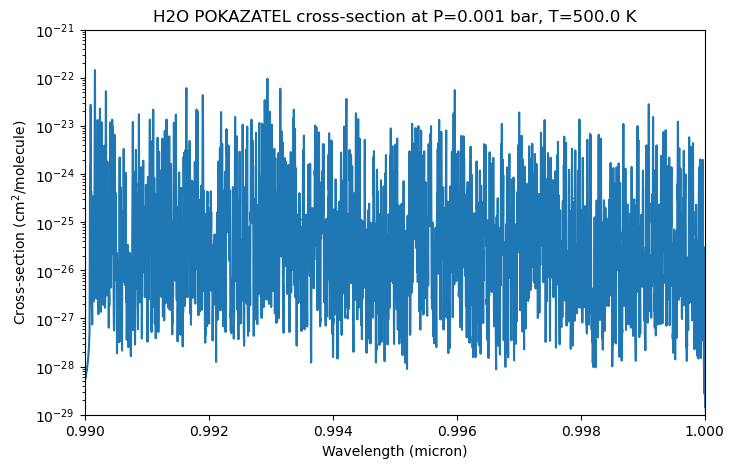
After calculating the opacities, we can plot them. Since we only used one pressure temperature point, we will just plot that one here. The line racer internal file format is a zarr compressed with zip, which can be read in easily with the zarr package.
[9]:
# Open read-only ZipStore
store = zarr.storage.ZipStore(final_cross_section_file_name, mode='a')
z = zarr.group(store=store)

# Access datasets
pressures = z['pressures'][:]
temperatures = z['temperatures'][:]
wavenumbers = z['wavenumbers'][:]
cross_section = z['cross-sections']

print("Pressures (Bar): ", pressures)
print("Temperatures (K): ", temperatures)

# Extract slice and plot
cross_section_slice = cross_section[:]
Pressures (Bar):  [0.001]
Temperatures (K):  [500.]
The cross-sections are stored in a 3D array with the shape (n_pressures, n_temperatures, n_wavenumbers). Here, we only have one pressure and temperature point, so we can just extract the first slice of the array. After that, we can plot the cross-sections.
[10]:
fig, ax = plt.subplots(figsize=(8, 5))
ax.plot(1/wavenumbers * 1e4, cross_section_slice[0, 0, :])  # convert wavenumber to wavelength in micron
ax.set_xlabel('Wavelength (micron)')
ax.set_ylabel('Cross-section (cm$^2$/molecule)')
ax.set_title(f'H2O POKAZATEL cross-section at P={pressures[0]} bar, T={temperatures[0]} K')
ax.set_yscale('log')
ax.set_xlim(0.99, 1.0)
ax.set_ylim(1e-29, 1e-21);
If you want to convert the file to the pRT format afterward, you can use the following function. For that you need to have a working petitRADTRANS installation. A guide on how to install petitRADTRANS can be found here.
If you use the pRT format, please provide the DOI of the line list you used for the calculation, so that it is stored in the file. Additionally, you can provide information you want to include into the file. The standard information includes the isotope list, the line racer version, the line list name, the broadening species dictionary, the broadening type, the cutoff and whether Hartmann corrections were used.
The rewrite parameter controls whether to overwrite an already existing file with the same name. If you want to keep the old file if one exists, set it to False. Additionally, if you want to use the petitRADTRANS input file path for storing the converted file, set use_prt_input_file_path=True. Note, that if you choose that and rewrite=True, your current pRT opacities are overwritten. If set to False, the files are stored in the prt format, but in a folder in the current
working directory called cross-sections_prt_format/. It will automatically calculate the opacities in the standard correlated-k and line-by-line format of petitRADTRANS.
[11]:
add_info = "this was a test calculation of H2O opacities using line racer."
doi = "10.1093/mnras/sty1877"  # doi of the line list

H2O_racer.convert_opacity_to_prt_format(final_cross_section_file_name, doi, rewrite=True, additional_information=add_info, use_prt_input_file_path=False)
Generating petitRADTRANS wavenumber grid... Done.
Reading opacity files in directory '.temporary_pRT_xsec_1H2-16O_POKAZATEL'...
Starting conversion of directory '.temporary_pRT_xsec_1H2-16O_POKAZATEL'...
 Reading file '.temporary_pRT_xsec_1H2-16O_POKAZATEL/xsec_1H2-16O_1.00e-03bar_500K.zarr' (1/1)... Done.
Preparation successful
Starting line-by-line conversion (boundaries: [ 0.3 28. ])...
Creating directory '/Users/haegele/codes/line_racer/docs/content/notebooks/cross-sections_prt_format/opacities/lines/line_by_line/H2O/1H2-16O'
 Writing line-by-line file '/Users/haegele/codes/line_racer/docs/content/notebooks/cross-sections_prt_format/opacities/lines/line_by_line/H2O/1H2-16O/1H2-16O__POKAZATEL.R1e6_0.3-28mu.xsec.petitRADTRANS.h5'...
Successfully converted files in '.temporary_pRT_xsec_1H2-16O_POKAZATEL' to line-by-line pRT files
Starting correlated-k conversion (R = 1000)...
 Reshaping...
 Initializing correlated-k parameters...
 Calculating correlated-k (19/7728)...
/Users/haegele/codes/line_racer/.pixi/envs/default/lib/python3.11/site-packages/petitRADTRANS/__file_conversion.py:3139: UserWarning: directory '.temporary_pRT_xsec_1H2-16O_POKAZATEL' contains only 1 files, the standard petitRADTRANS temperature-pressure grid size is 130; a finer temperature-pressure grid allows for a more accurate interpolation of the cross-sections
  warnings.warn(f"directory '{opacities_directory}' contains only {len(opacity_files)} files, "
 Done.lating correlated-k (7728/7728)...
Creating directory '/Users/haegele/codes/line_racer/docs/content/notebooks/cross-sections_prt_format/opacities/lines/correlated_k/H2O/1H2-16O'
 Writing file '/Users/haegele/codes/line_racer/docs/content/notebooks/cross-sections_prt_format/opacities/lines/correlated_k/H2O/1H2-16O/1H2-16O__POKAZATEL.R1000_0.1-250mu.ktable.petitRADTRANS.h5'...
Successfully converted files in '.temporary_pRT_xsec_1H2-16O_POKAZATEL' to correlated-k pRT files
Removed temporary folder .temporary_pRT_xsec_1H2-16O_POKAZATEL with the individual p T point files.
We can ignore the warning about the number of files, since we only used one pressure temperature point for demonstration purposes. In practice, you would use the whole line list or at least all files covering the wavelength region of interest. The resulting file can be directly used in petitRADTRANS.